Modifying Output
SlashDB allows you to control your view of a database query with various URL query string parameters (modifiers) that you can attach to the end of a resource URL. Some of these modifiers (e.g. sort, distinct) are analogous to SQL keywords for transforming data output. Others control how the SlashDB engine will render output or retrieve metadata for a resource (e.g. stream, schema)
Modifying Output in the GUI
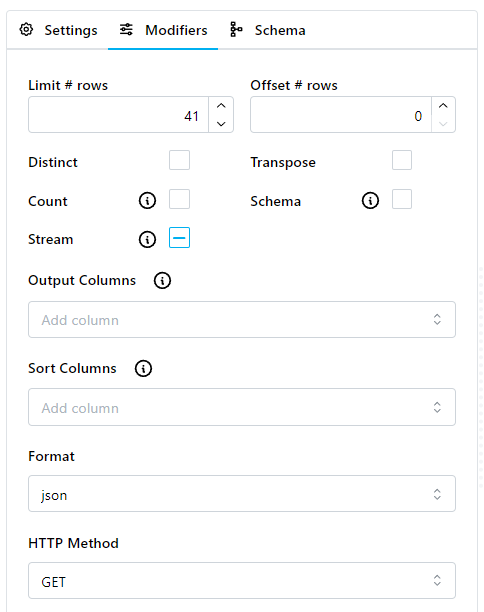
SQL Pass-thru modifiers can also be set in the GUI. The menu to access these settings can be accessed by selecting the Modifiers panel when executing or editing a query.
Most of these options correspond to a query string parameter that can be set in the URL, as described below.
See here for how to set Output Columns in the URL.
The HTTP Method modifier sets what HTTP method is used in the SlashDB GUI to send the request to the database server. Only methods that are enabled in the query configuration will be listed.
sort
This modifier allows you to sort the output of a result set. The original SQL statement is wrapped in additional SQL to use the ORDER BY keyword in the query. See here for more information.
distinct
This modifier allows you to remove duplicate rows from a result set. The original SQL statement is wrapped in additional SQL to use the DISTINCT keyword in the query. See here for more information.
limit and offset
These modifiers allow you to limit the number of rows returned from a result set, or skip rows entirely. See here for more information.
nullStr
Sets a custom placeholder value for NULL values. By default, when passing NULL values in URLs, the placeholder <null> is used. If you want to define your own placeholder, use the nullStr URL query string parameter (modifier). See here for more information.
transpose
This modifier transposes output by converting column to rows and rows to columns. See here for more information.
server_cursor
Important
Only for PostgreSQL - see Server-side Cursors for details.
stream
Reduces the amount of memory used on the server while sending output, and reduces the response time for data to return to the client. See here for more information.
count
When using this modifier in a request, the response will contain an additional header, SlashDB-All-Record-Count, that displays the total number of rows returned by the query.
Tip
This may be useful when using the limit and offset query parameters.
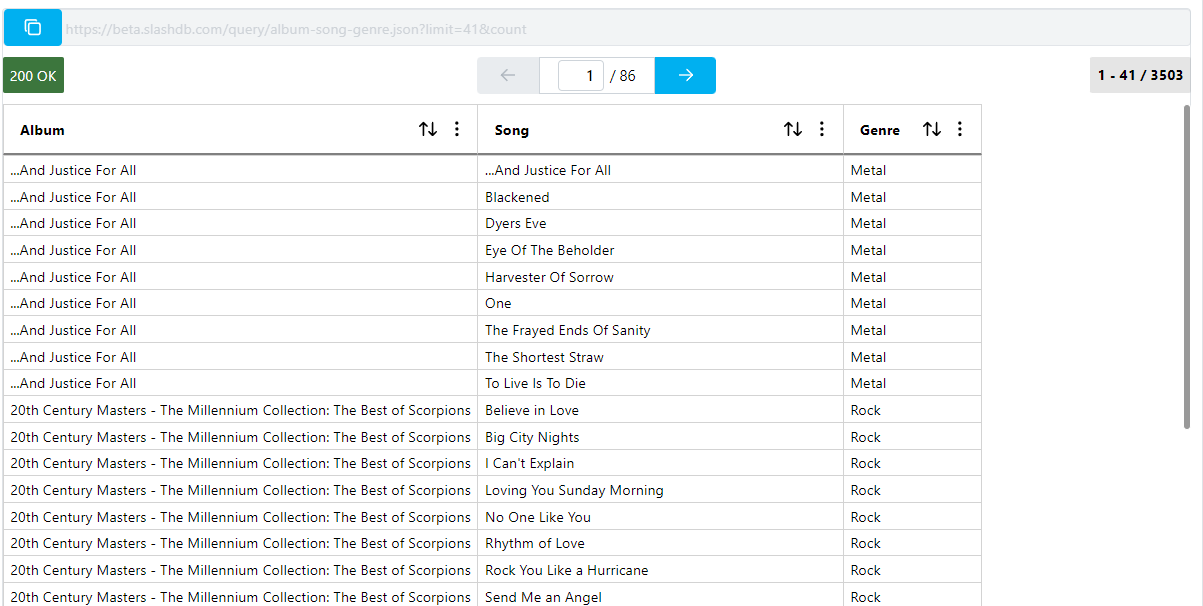
In the SQL Pass-Thru GUI, the Record Count indicator on the far right hand side of the page will show the current record offset for a given resource, and a count of total records. If count is not enabled, the indicator will just show the current record offset and a '?' character for the total.
Usage:
?count
Response Header:
SlashDB-All-Record-Count:2
Value type: (no value)
Default: (not used)
Examples:
/query/customers-in-city/city/Paris.json?count - response contains header with total number of rows returned by query (header SlashDB-All-Record-Count is 2)
/query/customers-in-city/city/Paris.json?count&limit=1 - like the above example but also using modifier limit=1, header SlashDB-All-Record-Count is still 2, even though there is a limit.
$ curl -v 'https://demo.slashdb.com/query/customers-in-city/city/Paris.json?count&limit=1'
* Hostname was NOT found in DNS cache
*   Trying 50.19.250.51...
* Connected to demo.slashdb.com (50.19.250.51) port 443 (#0)

[...]

> GET /query/customers-in-city/city/Paris.json?count&limit=1 HTTP/1.1
> User-Agent: curl/7.35.0
> Host: demo.slashdb.com
> Accept: */*
>
< HTTP/1.1 200 OK
* Server nginx/1.4.6 (Ubuntu) is not blacklisted
< Server: nginx/1.4.6 (Ubuntu)
< Date: Thu, 12 Jul 2018 15:00:22 GMT
< Content-Type: application/json
< Content-Length: 139
< Connection: keep-alive
< SlashDB-All-Record-Count: 2
<
[
    {
        "LastName": "Bernard",
        "State": null,
        "FirstName": "Camille",
        "Phone": "+33 01 49 70 65 65"
    }
]
schema
Returns a schema document for the requested query. Supported formats are JSON, XML, and CSV. Schemas are returned in JSON Schema, XSD, and CSV formats, respectively. This parameter does not take a value; its presence in the query string will cause a schema document to be returned.
Schemas can be streamed using the stream URL query string parameter (modifier).
Important
Schemas are only available for queries that return data. See Schemas for more information.
Usage:
?schema
Value type: N/A
Default: N/A
Applicable to: JSON, XML, CSV formats. Resources, vectors, arrays, scalars.
Examples:
/query/customers-in-city/city/Paris.json?schema- return JSON schema for customers-in-city query
XML-specific
nil_visible
This modifier includes empty tags in XML responses. See here for more info.
xmlType
This modifier changes the XML output to support custom XML formats.
Usage:
?xmlType=[name_of_xml_type]
Value type: string
Value options:
- adPersistXML - MS XML Persistance Format contains schema and data in a single document
Default: (not used)
Examples:
/query/customers-in-city/city/Paris.xml?xmlType=adPersistXML - renders XML in Persistance Format.
JSON-specific
jsonNanInf
This modifier controls how nan, inf, and -inf values in floating point columns will be handled in JSON requests for databases that support the IEEE 754-1985 specification.
See here for more info.
Selecting Columns
You can retrieve specific columns from query results. Simply append the column or columns you wish to retrieve to the end of the URL path, separated by a , character.
Examples:
/query/customers-in-city/city/Paris/FirstName.json?limit=10 - retrieve only the FirstName column from the query results
/query/customers-in-city/city/Paris/FirstName,LastName.json?limit=10 - retrieve the FirstName and LastName column from the query results