Server-side Cursors
Important
SlashDB supports server-side cursors only for PostgreSQL.
Some database servers allow for fetching data in chunks, keeping a query result in server memory as they are retrieved. This feature is known as a server-side cursor.
Note
- Support and exact behavior differs between database types and their respective drivers
- When combined with streaming, they reduce client memory usage
- Suited for queries that return a large number of rows
- Some limitations in different dialects - e.g. in PostgreSQL, they can't be used with DDL statements.
Enabling by Default
To enable them by default for PostgreSQL, set the server_cursor INI setting.
Setting in the URL
Use the server_cursor modifier. For optimal usage, combine with stream. This option will only work with PostgreSQL databases.
Usage:
?server_cursor=[true_or_false]
Value type: boolean (true or false)
Default: value from INI (if not present in INI, default is false)
Applicable to: List of objects, list of arrays, vectors, single resource, single array, scalar
Examples:
/InvoiceLine.json?stream=true&server_cursor=true - stream all InvoiceLine records (list of approx. 2240 objects) using a server-side cursor
Setting in the GUI
The Server Cursor checkbox will only be seen when working with PostgreSQL databases.
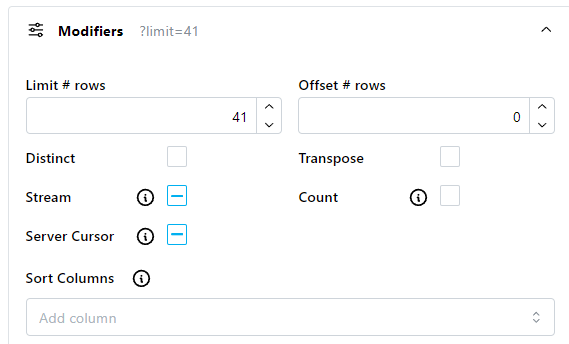
For Data Discovery, open the Filters panel. Expand the Modifiers element, and Server Cursor will appear as a checkbox. It is a three-way toggle - enabled, disabled, or INI value.
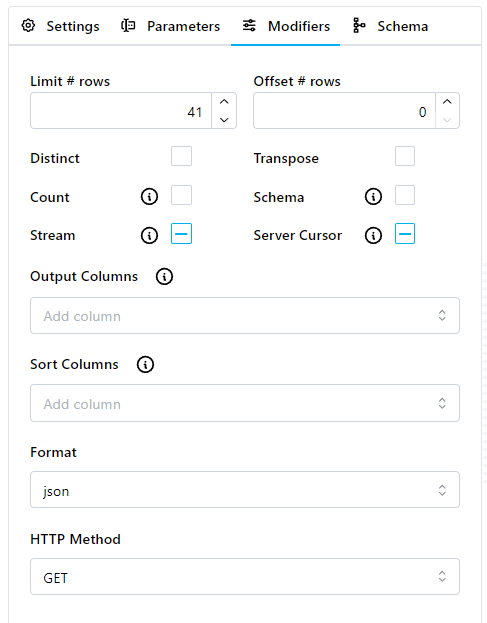
For SQL Pass-thru or Run Queries, click the Modifiers tab, and Server Cursor will appear as a checkbox. It is a three-way toggle - enabled, disabled, or INI value.